

Print

Student Handout 11 - Empowerment: Awareness Week Campaign

image.png

Awareness Weeks heighten attention toward important topics or issues over an extended
period of time. Each day presents a different activity that will keep your audience engaged
and connected with the message which you are driving home. Organize your own Awareness
Week and show your community the importance of your cause!



iDrive Youth Outreach & Empowerment Program

Prepare students to make a positive influence on the world through iDrive. iDrive is the Youth Outreach and Empowerment program of i-SAFE. Student-driven projects promote digital citizenship by empowering students to purposefully engage online and to deeply contribute to their communities.

iDrive Youth Outreach & Empowerment: Student Toolkit

Prepare students to make a positive influence on the world through iDrive. iDrive is the Youth Outreach and Empowerment program of i-SAFE. Student-driven projects promote digital citizenship by empowering students to purposefully engage online and to deeply contribute to their communities.


Student Handout 1 - Empowerment: About iDrive - Where the Rubber Meets the Road

Prepare students to make a positive influence on the world through iDrive. iDrive is the Youth Outreach and Empowerment program of i-SAFE. Student-driven projects promote digital citizenship by empowering students to purposefully engage online and to deeply contribute to their communities.

Student Handout 2- Worksheet: Let's Get Things Started

Prepare students to make a positive influence on the world through iDrive. iDrive is the Youth Outreach and Empowerment program of i-SAFE. Student-driven projects promote digital citizenship by empowering students to purposefully engage online and to deeply contribute to their communities.

Student Handout 3 - Worksheet: Pitch Your Initiative

Prepare students to make a positive influence on the world through iDrive. iDrive is the Youth Outreach and Empowerment program of i-SAFE. Student-driven projects promote digital citizenship by empowering students to purposefully engage online and to deeply contribute to their communities.

Student Handout 4 - Reference Page: iDrive Agent Activities - Get it Together!

Prepare students to make a positive influence on the world through iDrive. iDrive is the Youth Outreach and Empowerment program of i-SAFE. Student-driven projects promote digital citizenship by empowering students to purposefully engage online and to deeply contribute to their communities.
Student Handout 5 - Empowerment: Reach Out - Information Distribution

Prepare students to make a positive influence on the world through iDrive. iDrive is the Youth Outreach and Empowerment program of i-SAFE. Student-driven projects promote digital citizenship by empowering students to purposefully engage online and to deeply contribute to their communities.
Student Handout 6 - Empowerment: Speak Up & Listen - Plan a Workshop

Prepare students to make a positive influence on the world through iDrive. iDrive is the Youth Outreach and Empowerment program of i-SAFE. Student-driven projects promote digital citizenship by empowering students to purposefully engage online and to deeply contribute to their communities.
Student Handout 7 - Empowerment: Make it Real - Roleplay

Prepare students to make a positive influence on the world through iDrive. iDrive is the Youth Outreach and Empowerment program of i-SAFE. Student-driven projects promote digital citizenship by empowering students to purposefully engage online and to deeply contribute to their communities.
Student Handout 8 - Empowerment: Go Public with a PSA

Prepare students to make a positive influence on the world through iDrive. iDrive is the Youth Outreach and Empowerment program of i-SAFE. Student-driven projects promote digital citizenship by empowering students to purposefully engage online and to deeply contribute to their communities.
Student Handout 9 - Empowerment: Short Form Documentary

Prepare students to make a positive influence on the world through iDrive. iDrive is the Youth Outreach and Empowerment program of i-SAFE. Student-driven projects promote digital citizenship by empowering students to purposefully engage online and to deeply contribute to their communities.
Student Handout 10 - Empowerment: Mass Media Megaphone

Prepare students to make a positive influence on the world through iDrive. iDrive is the Youth Outreach and Empowerment program of i-SAFE. Student-driven projects promote digital citizenship by empowering students to purposefully engage online and to deeply contribute to their communities.
Student Handout 11 - Empowerment: Awareness Week Campaign

Prepare students to make a positive influence on the world through iDrive. iDrive is the Youth Outreach and Empowerment program of i-SAFE. Student-driven projects promote digital citizenship by empowering students to purposefully engage online and to deeply contribute to their communities.
Student Handout 12 - Empowerment: Personal Release Form

Prepare students to make a positive influence on the world through iDrive. iDrive is the Youth Outreach and Empowerment program of i-SAFE. Student-driven projects promote digital citizenship by empowering students to purposefully engage online and to deeply contribute to their communities.

Print

Teacher Reference Page 1 - About iDrive: Where the Rubber Meets the Road

Description

Educators for Youth Empowerment
image.png

Educators, like you, pave the way for students to
use technology in creative, effective and responsible
ways by implementing ISAFE’s e-Safety instructional
programming into your classrooms. Once your students
have completed ISAFE instruction, we encourage you
to have students (13 yrs. of age and older) register


iDrive Youth Outreach & Empowerment Program

iDrive Youth Outreach & Empowerment Program

Prepare students to make a positive influence on the world through iDrive. iDrive is the Youth Outreach and Empowerment program of i-SAFE. Student-driven projects promote digital citizenship by empowering students to purposefully engage online and to deeply contribute to their communities.

iDrive Youth Outreach & Empowerment: Teacher Toolkit

iDrive Youth Outreach & Empowerment: Teacher Toolkit

Prepare students to make a positive influence on the world through iDrive. iDrive is the Youth Outreach and Empowerment program of i-SAFE. Student-driven projects promote digital citizenship by empowering students to purposefully engage online and to deeply contribute to their communities.

Teacher Reference Page 1 - About iDrive: Where the Rubber Meets the Road

Teacher Reference Page 1 - About iDrive: Where the Rubber Meets the Road

Prepare students to make a positive influence on the world through iDrive. iDrive is the Youth Outreach and Empowerment program of i-SAFE. Student-driven projects promote digital citizenship by empowering students to purposefully engage online and to deeply contribute to their communities.

Teacher Reference Page 2 - Getting Started Guide for Educators

Teacher Reference Page 2 - Getting Started Guide for Educators

Prepare students to make a positive influence on the world through iDrive. iDrive is the Youth Outreach and Empowerment program of i-SAFE. Student-driven projects promote digital citizenship by empowering students to purposefully engage online and to deeply contribute to their communities.

Teacher Reference Page 3 - Let's Get Things Started: Teacher Edition

Teacher Reference Page 3 - Let's Get Things Started: Teacher Edition

Prepare students to make a positive influence on the world through iDrive. iDrive is the Youth Outreach and Empowerment program of i-SAFE. Student-driven projects promote digital citizenship by empowering students to purposefully engage online and to deeply contribute to their communities.

Teacher Reference Page 4 - Pitch Your Initiative

Teacher Reference Page 4 - Pitch Your Initiative

Prepare students to make a positive influence on the world through iDrive. iDrive is the Youth Outreach and Empowerment program of i-SAFE. Student-driven projects promote digital citizenship by empowering students to purposefully engage online and to deeply contribute to their communities.

Student Advisory Board Flyer

Student Advisory Board Flyer

Prepare students to make a positive influence on the world through iDrive. iDrive is the Youth Outreach and Empowerment program of i-SAFE. Student-driven projects promote digital citizenship by empowering students to purposefully engage online and to deeply contribute to their communities.

Print

Teacher Reference Page 3 - Let's Get Things Started: Teacher Edition

Description

Define the Challenge JUMP START:

          image.png

Browse the Hot Topics on the sidebar. Check all of the boxes that interest you. (examples are marked)
  ☐ Body Image and Media
  ☐ Physical/Mental Abilities

IGNITION

          image.png


iDrive Youth Outreach & Empowerment Program

iDrive Youth Outreach & Empowerment Program

Prepare students to make a positive influence on the world through iDrive. iDrive is the Youth Outreach and Empowerment program of i-SAFE. Student-driven projects promote digital citizenship by empowering students to purposefully engage online and to deeply contribute to their communities.

iDrive Youth Outreach & Empowerment: Teacher Toolkit

iDrive Youth Outreach & Empowerment: Teacher Toolkit

Prepare students to make a positive influence on the world through iDrive. iDrive is the Youth Outreach and Empowerment program of i-SAFE. Student-driven projects promote digital citizenship by empowering students to purposefully engage online and to deeply contribute to their communities.

Teacher Reference Page 1 - About iDrive: Where the Rubber Meets the Road

Teacher Reference Page 1 - About iDrive: Where the Rubber Meets the Road

Prepare students to make a positive influence on the world through iDrive. iDrive is the Youth Outreach and Empowerment program of i-SAFE. Student-driven projects promote digital citizenship by empowering students to purposefully engage online and to deeply contribute to their communities.

Teacher Reference Page 2 - Getting Started Guide for Educators

Teacher Reference Page 2 - Getting Started Guide for Educators

Prepare students to make a positive influence on the world through iDrive. iDrive is the Youth Outreach and Empowerment program of i-SAFE. Student-driven projects promote digital citizenship by empowering students to purposefully engage online and to deeply contribute to their communities.

Teacher Reference Page 3 - Let's Get Things Started: Teacher Edition

Teacher Reference Page 3 - Let's Get Things Started: Teacher Edition

Prepare students to make a positive influence on the world through iDrive. iDrive is the Youth Outreach and Empowerment program of i-SAFE. Student-driven projects promote digital citizenship by empowering students to purposefully engage online and to deeply contribute to their communities.

Teacher Reference Page 4 - Pitch Your Initiative

Teacher Reference Page 4 - Pitch Your Initiative

Prepare students to make a positive influence on the world through iDrive. iDrive is the Youth Outreach and Empowerment program of i-SAFE. Student-driven projects promote digital citizenship by empowering students to purposefully engage online and to deeply contribute to their communities.

Student Advisory Board Flyer

Student Advisory Board Flyer

Prepare students to make a positive influence on the world through iDrive. iDrive is the Youth Outreach and Empowerment program of i-SAFE. Student-driven projects promote digital citizenship by empowering students to purposefully engage online and to deeply contribute to their communities.

Print

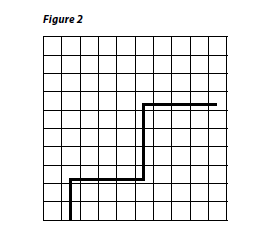
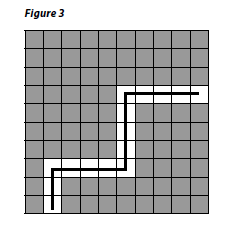
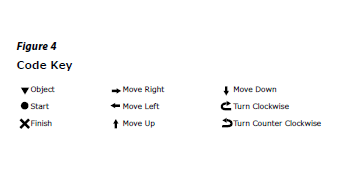
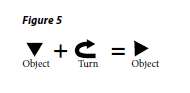
Teacher Reference Page - Create-a-Maze Examples & Code Key

Description

image.pngimage.png

image.pngimage.png

image.pngimage.png


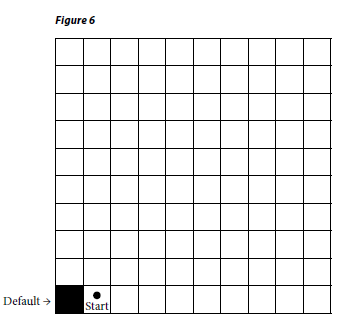
Lesson - App-titude: Understanding Basic Code

Lesson - App-titude: Understanding Basic Code

Students come to understand that online games and gaming apps are software programs made up of code. Students design a game using a symbolic code to write a set of instructions and relate to principles of coding to game development and programming. The lesson may serve as an introduction to STEM/STEAM programs.

Teacher Reference Page - Create-a-Maze Examples & Code Key

Teacher Reference Page - Create-a-Maze Examples & Code Key

Students come to understand that online games and gaming apps are software programs made up of code. Students design a game using a symbolic code to write a set of instructions and relate to principles of coding to game development and programming. The lesson may serve as an introduction to STEM/STEAM programs.

Student Handout 1 - Worksheet: Create-a-Maze

Student Handout 1 - Worksheet: Create-a-Maze

Students come to understand that online games and gaming apps are software programs made up of code. Students design a game using a symbolic code to write a set of instructions and relate to principles of coding to game development and programming. The lesson may serve as an introduction to STEM/STEAM programs.

Print

Student Handout 1 - Worksheet: Create-a-Maze

image.png


Lesson - App-titude: Understanding Basic Code

Students come to understand that online games and gaming apps are software programs made up of code. Students design a game using a symbolic code to write a set of instructions and relate to principles of coding to game development and programming. The lesson may serve as an introduction to STEM/STEAM programs.

Teacher Reference Page - Create-a-Maze Examples & Code Key

Students come to understand that online games and gaming apps are software programs made up of code. Students design a game using a symbolic code to write a set of instructions and relate to principles of coding to game development and programming. The lesson may serve as an introduction to STEM/STEAM programs.

Student Handout 1 - Worksheet: Create-a-Maze

Students come to understand that online games and gaming apps are software programs made up of code. Students design a game using a symbolic code to write a set of instructions and relate to principles of coding to game development and programming. The lesson may serve as an introduction to STEM/STEAM programs.

Print

Student Handout 2 - Reference Page: Sample Website - The North American Bobcat Rescue

image.png


Lesson - Digital Literacy Connections: Webcams in Our World

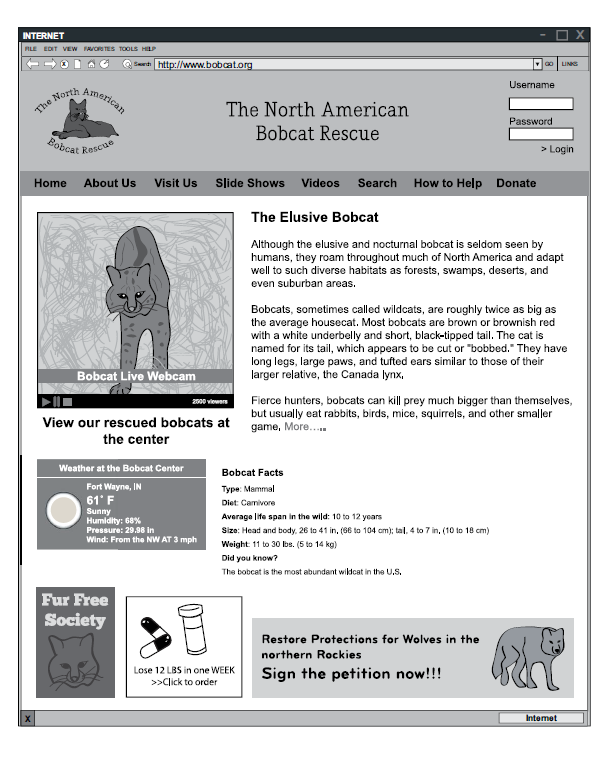
Students develop digital literacy skills. They determine ways that organizations effectively use webcams to promote a cause by evaluating a series of websites. They learn that these sites may allow online ads to generate financial support, and develop guidelines for public websites to follow.

Student Handout 1 - Worksheet: Webcams in Our World

Students develop digital literacy skills. They determine ways that organizations effectively use webcams to promote a cause by evaluating a series of websites. They learn that these sites may allow online ads to generate financial support, and develop guidelines for public websites to follow.

Student Handout 2 - Reference Page: Sample Website - The North American Bobcat Rescue

Students develop digital literacy skills. They determine ways that organizations effectively use webcams to promote a cause by evaluating a series of websites. They learn that these sites may allow online ads to generate financial support, and develop guidelines for public websites to follow.

Print

Teacher Reference Page - Game Design Example & Code Key

Description

image.png


Lesson - App-titude: Understanding Basic Code

Lesson - App-titude: Understanding Basic Code

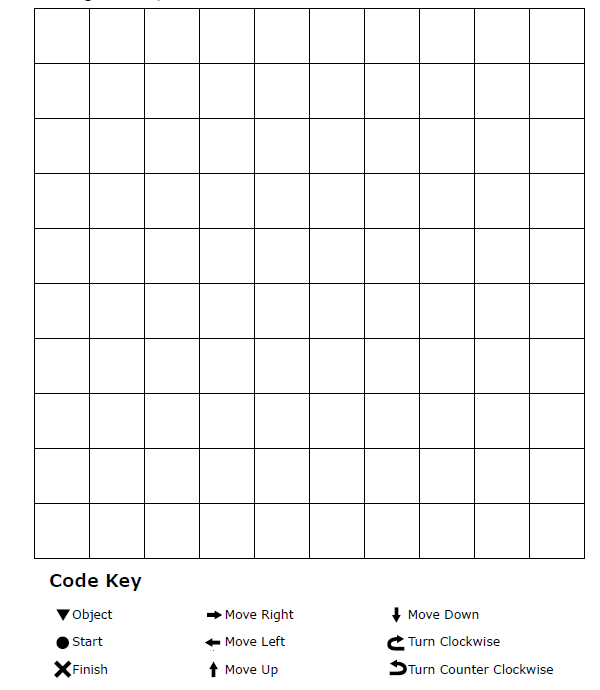
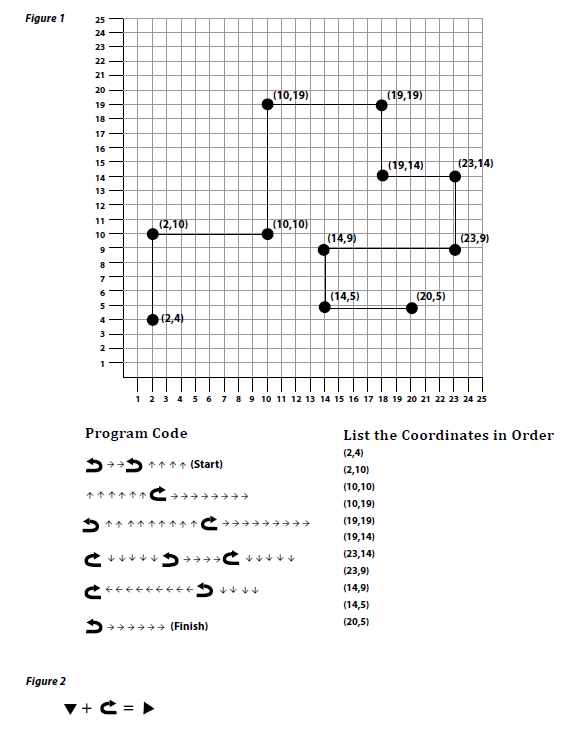
Students come to understand the security and privacy issues involved in downloading apps. They design a game by plotting (x,y) coordinates; use a symbolic code to write a set of instructions; "debug" the code, and relate to principles of coding to game development and programming in a class discussion. The lesson may serve as an introduction to STEM/STEAM programs.

Teacher Reference Page - Game Design Example & Code Key

Teacher Reference Page - Game Design Example & Code Key

Students come to understand the security and privacy issues involved in downloading apps. They design a game by plotting (x,y) coordinates; use a symbolic code to write a set of instructions; "debug" the code, and relate to principles of coding to game development and programming in a class discussion. The lesson may serve as an introduction to STEM/STEAM programs.

Student Handout 1 - Reference Page: Instructions - Running Code as a Digital Classmate

Student Handout 1 - Reference Page: Instructions - Running Code as a Digital Classmate

Students come to understand the security and privacy issues involved in downloading apps. They design a game by plotting (x,y) coordinates; use a symbolic code to write a set of instructions; "debug" the code, and relate to principles of coding to game development and programming in a class discussion. The lesson may serve as an introduction to STEM/STEAM programs.

Student Handout 2 - Worksheet: Game Design Grid & Code Key

Student Handout 2 - Worksheet: Game Design Grid & Code Key

Students come to understand the security and privacy issues involved in downloading apps. They design a game by plotting (x,y) coordinates; use a symbolic code to write a set of instructions; "debug" the code, and relate to principles of coding to game development and programming in a class discussion. The lesson may serve as an introduction to STEM/STEAM programs.

Print

Student Handout 2 - Worksheet: Game Design Grid & Code Key

image.png


Lesson - App-titude: Understanding Basic Code

Students come to understand the security and privacy issues involved in downloading apps. They design a game by plotting (x,y) coordinates; use a symbolic code to write a set of instructions; "debug" the code, and relate to principles of coding to game development and programming in a class discussion. The lesson may serve as an introduction to STEM/STEAM programs.

Teacher Reference Page - Game Design Example & Code Key

Students come to understand the security and privacy issues involved in downloading apps. They design a game by plotting (x,y) coordinates; use a symbolic code to write a set of instructions; "debug" the code, and relate to principles of coding to game development and programming in a class discussion. The lesson may serve as an introduction to STEM/STEAM programs.

Student Handout 1 - Reference Page: Instructions - Running Code as a Digital Classmate

Students come to understand the security and privacy issues involved in downloading apps. They design a game by plotting (x,y) coordinates; use a symbolic code to write a set of instructions; "debug" the code, and relate to principles of coding to game development and programming in a class discussion. The lesson may serve as an introduction to STEM/STEAM programs.

Student Handout 2 - Worksheet: Game Design Grid & Code Key

Students come to understand the security and privacy issues involved in downloading apps. They design a game by plotting (x,y) coordinates; use a symbolic code to write a set of instructions; "debug" the code, and relate to principles of coding to game development and programming in a class discussion. The lesson may serve as an introduction to STEM/STEAM programs.

Print

Student Handout 2 - Reference Page: Website Evaluation Process

Before You Begin:
Pre-Evaluation

Before you even start your search for information, take time to think about what you are looking for. Identify
whether you are looking for facts or opinions. If you want opinions, do you want respected experts or just
anybody? Do you need statistics, narratives, eyewitness accounts or descriptions? Are you looking to support
your own position or prove something? By having a firmly identified goal you will be able to screen sources
against that goal quickly and easily.


Lesson - Website Validity and Reliability

Students come to understand that online resources are not always reliable. They conduct a Web search on a number of given topics and use a set of criteria to determine whether an online source is valid, reliable and credible. They ensure that information is accurate. Students support their conclusions with reasoning and examples.

Student Handout 1 - Worksheet: Reliability and Validity

Students come to understand that online resources are not always reliable. They conduct a Web search on a number of given topics and use a set of criteria to determine whether an online source is valid, reliable and credible. They ensure that information is accurate. Students support their conclusions with reasoning and examples.

Student Handout 2 - Reference Page: Website Evaluation Process

Students come to understand that online resources are not always reliable. They conduct a Web search on a number of given topics and use a set of criteria to determine whether an online source is valid, reliable and credible. They ensure that information is accurate. Students support their conclusions with reasoning and examples.

Student Handout 3 - Worksheet: Think About It: Selecting Credible Online Sources

Students come to understand that online resources are not always reliable. They conduct a Web search on a number of given topics and use a set of criteria to determine whether an online source is valid, reliable and credible. They ensure that information is accurate. Students support their conclusions with reasoning and examples.

Print

Student Handout 1 - Reference Page: Successful Search Engine Use: Types of Search Engines

Types of Search Enginesimage.png

Internet search engines are devoted to helping
people find information stored on Web sites. Search
engines can work in different ways, BUT they all perform
these three basic tasks:


Lesson - Successful Searches for Better Digital Literacy

Students learn how to develop effective search queries that produce higher quality results. They identify relevant and valid information from credible sources when using the Internet for information and research. Students acquire age-appropriate technical knowledge by learning about various types of search engines and operations.

Student Handout 1 - Reference Page: Successful Search Engine Use: Types of Search Engines

Students learn how to develop effective search queries that produce higher quality results. They identify relevant and valid information from credible sources when using the Internet for information and research. Students acquire age-appropriate technical knowledge by learning about various types of search engines and operations.

Student Handout 2 - Reference Page: Successful Search Engine Use: Operator Strategies

Students learn how to develop effective search queries that produce higher quality results. They identify relevant and valid information from credible sources when using the Internet for information and research. Students acquire age-appropriate technical knowledge by learning about various types of search engines and operations.

Student Handout 3 - Worksheet: Investigative Questions

Students learn how to develop effective search queries that produce higher quality results. They identify relevant and valid information from credible sources when using the Internet for information and research. Students acquire age-appropriate technical knowledge by learning about various types of search engines and operations.

Subscribe to Science