
Print

Student Handout 4 - Worksheet: Medical and Pharmaceutical Information

Medical and Pharmaceutical Information Online

Learning Objectives
Upon completion of this section you should be able to:
  • Understand the terms: reliability and validity
  • Understand how the right to freedom of speech affects information online
  • Relate how online resources are not always well balanced and fair
  • Identify the pros and cons of utilizing the Internet for medical research and support

Terms to Know
• Pharmaceutical
• Reliable
• Valid
• Freedom of speech



Unit - Substance Abuse Issues in an Online Culture (High School Unit)

This unit integrates e-Safety with Health Science as well as drug prevention and awareness programs (e.g. Ribbon Week). Students discover how peer pressure, advertisements and online environments influence youth to engage in substance abuse. The student workbook provides information on the underground network and risks associated with online access to prescription and OTC drugs.

Lesson - Medical & Pharmaceutical Information Online

Students develop media and information literacy skills. They conduct a short research project on medical issues and pharmaceuticals, and they evaluate online information sources. Students come to understand that credible, accurate, reliable sources of information are crucial to support valid scientific research.

Student Handout 4 - Worksheet: Medical and Pharmaceutical Information

Students develop media and information literacy skills. They conduct a short research project on medical issues and pharmaceuticals, and they evaluate online information sources. Students come to understand that credible, accurate, reliable sources of information are crucial to support valid scientific research.


Print

Student Handout 4 - Worksheet: Medical and Pharmaceutical Information Online


Learning Objectives
Upon completion of this section you should be able to:
• Understand the terms: reliability and validity
• Understand how the right to freedom of speech affects information online
• Relate how online resources are not always well balanced and fair
• Identify the pros and cons of utilizing the Internet for medical research and support

Terms to Know
• Pharmaceutical
• Reliable
• Valid
•Freedom of speech


Unit - Substance Abuse Issues in an Online Culture

This unit integrates e-Safety with Health Science as well as drug prevention and awareness programs (e.g. Ribbon Week). Students discover how peer pressure, advertisements and online environments influence youth to engage in substance abuse. The student workbook provides information on the underground network and risks associated with online access to prescription and OTC drugs.

Lesson - Medical & Pharmaceutical Information Online

Students develop media and information literacy skills. They conduct a short research project on medical issues and pharmaceuticals, and they evaluate online information sources. Students come to understand that credible, accurate, reliable sources of information are crucial to support valid scientific research.
Student Handout 4 - Worksheet: Medical and Pharmaceutical Information Online

Students develop media and information literacy skills. They conduct a short research project on medical issues and pharmaceuticals, and they evaluate online information sources. Students come to understand that credible, accurate, reliable sources of information are crucial to support valid scientific research.

Print

Student Handout 5 - Worksheet: My Online and Offline Persona

Instructions: Fill in the characteristics that describe your online persona to the left. Compare these characteristics with your offline “self” on the right.

image.png


Unit - Your Identity Online

In this comprehensive unit, students learn that social media is a powerful shaping force in the development of identity and self-concept. They apply the theories of psychologists Carl Rogers and C.H. Cooper to the formation of identity and self-concept. They then determine the safety and security issues that arise from revealing degrees of personal information online.

Lesson Plan - Who Are You Online?

In this comprehensive unit, students learn that social media is a powerful shaping force in the development of identity and self-concept. They apply the theories of psychologists Carl Rogers and C.H. Cooper to the formation of identity and self-concept. They then determine the safety and security issues that arise from revealing degrees of personal information online.

Teacher Reference Page - Answer Key: Notes on the Looking Glass Self

In this comprehensive unit, students learn that social media is a powerful shaping force in the development of identity and self-concept. They apply the theories of psychologists Carl Rogers and C.H. Cooper to the formation of identity and self-concept. They then determine the safety and security issues that arise from revealing degrees of personal information online.

Teacher Reference Page - Answer Key: Teacher of the Year?

In this comprehensive unit, students learn that social media is a powerful shaping force in the development of identity and self-concept. They apply the theories of psychologists Carl Rogers and C.H. Cooper to the formation of identity and self-concept. They then determine the safety and security issues that arise from revealing degrees of personal information online.

Teacher Reference Page - Answer Key: Problems with Online Personas

In this comprehensive unit, students learn that social media is a powerful shaping force in the development of identity and self-concept. They apply the theories of psychologists Carl Rogers and C.H. Cooper to the formation of identity and self-concept. They then determine the safety and security issues that arise from revealing degrees of personal information online.

Student Handout 3 - Worksheet: Notes on the Looking Glass Self

In this comprehensive unit, students learn that social media is a powerful shaping force in the development of identity and self-concept. They apply the theories of psychologists Carl Rogers and C.H. Cooper to the formation of identity and self-concept. They then determine the safety and security issues that arise from revealing degrees of personal information online.

Student Handout 4 - Worksheet: The Looking Glass Self

In this comprehensive unit, students learn that social media is a powerful shaping force in the development of identity and self-concept. They apply the theories of psychologists Carl Rogers and C.H. Cooper to the formation of identity and self-concept. They then determine the safety and security issues that arise from revealing degrees of personal information online.

Student Handout 6 - Worksheet: Teacher of the Year?

In this comprehensive unit, students learn that social media is a powerful shaping force in the development of identity and self-concept. They apply the theories of psychologists Carl Rogers and C.H. Cooper to the formation of identity and self-concept. They then determine the safety and security issues that arise from revealing degrees of personal information online.

Student Handout 7 - Worksheet: Problems with Online Personas

In this comprehensive unit, students learn that social media is a powerful shaping force in the development of identity and self-concept. They apply the theories of psychologists Carl Rogers and C.H. Cooper to the formation of identity and self-concept. They then determine the safety and security issues that arise from revealing degrees of personal information online.

Print

Lesson Plan - Who Are You?

Description

Lesson Overview

In this lesson, students explore their identities and self-concept.


Unit - Your Identity Online

Unit - Your Identity Online

In this comprehensive unit, students learn that social media is a powerful shaping force in the development of identity and self-concept. They apply the theories of psychologists Carl Rogers and C.H. Cooper to the formation of identity and self-concept. They then determine the safety and security issues that arise from revealing degrees of personal information online.

Teacher Reference Page - Answer Key: Who Are You?

Teacher Reference Page - Answer Key: Who Are You?

In this comprehensive unit, students learn that social media is a powerful shaping force in the development of identity and self-concept. They apply the theories of psychologists Carl Rogers and C.H. Cooper to the formation of identity and self-concept. They then determine the safety and security issues that arise from revealing degrees of personal information online.

Student Handout 1 - Worksheet: Who Are You?

Student Handout 1 - Worksheet: Who Are You?

In this comprehensive unit, students learn that social media is a powerful shaping force in the development of identity and self-concept. They apply the theories of psychologists Carl Rogers and C.H. Cooper to the formation of identity and self-concept. They then determine the safety and security issues that arise from revealing degrees of personal information online.

Student Handout 2 - Worksheet: Identity Mapping

Student Handout 2 - Worksheet: Identity Mapping

In this comprehensive unit, students learn that social media is a powerful shaping force in the development of identity and self-concept. They apply the theories of psychologists Carl Rogers and C.H. Cooper to the formation of identity and self-concept. They then determine the safety and security issues that arise from revealing degrees of personal information online.

Print

Student Handout 3 - Empowerment Project: iDrive Toolkit

Click on the resource below to view in full screen.


Teacher Reference Page - Empowerment Project: iDrive Toolkit

Prepare students to make a positive influence on the world with iDrive. iDrive is the Youth Outreach and Empowerment program of i-SAFE. Student-driven projects promote digital citizenship by empowering students to purposefully engage online and to deeply contribute to their communities.

Student Handout 4 - Empowerment: iDrive Student Advisory Board Flyer

Prepare students to make a positive influence on the world with iDrive. iDrive is the Youth Outreach and Empowerment program of i-SAFE. Student-driven projects promote digital citizenship by empowering students to purposefully engage online and to deeply contribute to their communities.

Print

Student Handout 2 - Empowerment: Personal Release Form

I, _______________________________________________________ (Print Name), do hereby grant ISAFE, including (without limitation) its principals, employees, agents, affiliates, contractors, successors and assigns, permission to use my likeness, voice, picture, name, and/or intellectual property (“content”) for print, radio, webcast, film, television or Internet broadcast anywhere throughout the United States and the world, and to edit such material on film or videotape or other media formats.


Lesson Plan - Webcast: Cyber Harassment: Online Bullying and Stalking

Students investigate issues related to cyber harassment, define online bullying and stalking, and identify laws and consequences of cyber bullying. They understand the cause and effects of cyber bullying through Ryan Halligan's story. As a result of their learning, students launch an awareness campaign.

Print

Student Handout 4 - Empowerment: iDrive Empowerment Program

image.pngKnowledge can inspire action in the real world. After completing ISAFE lessons, or even lessons that connect core content to current issues, present students with the opportunity to participate in iDrive social media programming.
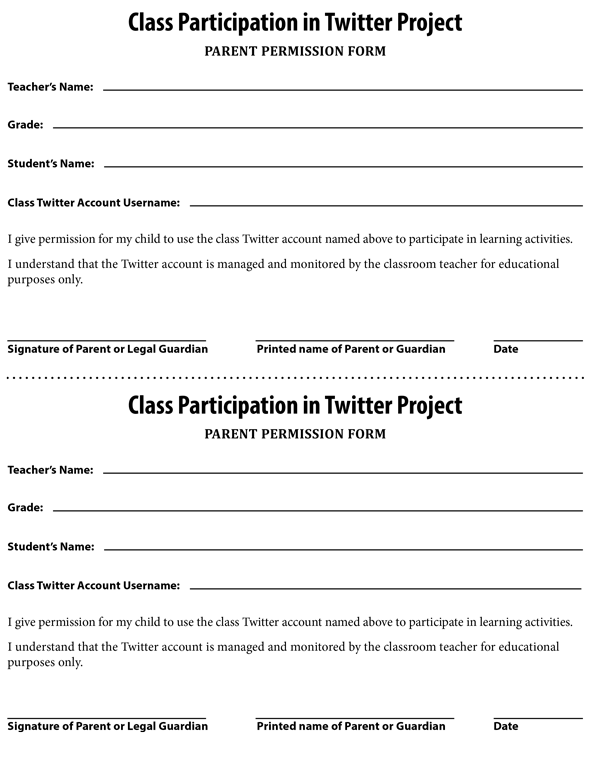
iDrive is a youth-led, youth-inspired outreach and empowerment program of ISAFE; a community of young people who are fueled with ideas and driven to do something


Unit - Twitter Guide for Education

Students practice digital citizenship and responsible use through a class Twitter account. They learn how to compose the most effective tweet, use hashtags, protect privacy/security, and apply Twitter etiquette. They use Twitter to collaborate and complete assignments and suggested assignments across curriculum topics. Classroom integration and ideas for school-based social media use are included. Visit www.isafedirect.com for more information on using commercial sites and apps in education.

Teacher Reference Page 1 - Twitter Basics

Students practice digital citizenship and responsible use through a class Twitter account. They learn how to compose the most effective tweet, use hashtags, protect privacy/security, and apply Twitter etiquette. They use Twitter to collaborate and complete assignments and suggested assignments across curriculum topics. Classroom integration and ideas for school-based social media use are included. Visit www.isafedirect.com for more information on using commercial sites and apps in education.

Teacher Reference Page 2 - Getting Started

Students practice digital citizenship and responsible use through a class Twitter account. They learn how to compose the most effective tweet, use hashtags, protect privacy/security, and apply Twitter etiquette. They use Twitter to collaborate and complete assignments and suggested assignments across curriculum topics. Classroom integration and ideas for school-based social media use are included. Visit www.isafedirect.com for more information on using commercial sites and apps in education.

Teacher Reference Page 3 – Privacy Settings

Students practice digital citizenship and responsible use through a class Twitter account. They learn how to compose the most effective tweet, use hashtags, protect privacy/security, and apply Twitter etiquette. They use Twitter to collaborate and complete assignments and suggested assignments across curriculum topics. Classroom integration and ideas for school-based social media use are included. Visit www.isafedirect.com for more information on using commercial sites and apps in education.

Teacher Reference Page 4 - A Connected Learning Community

Students practice digital citizenship and responsible use through a class Twitter account. They learn how to compose the most effective tweet, use hashtags, protect privacy/security, and apply Twitter etiquette. They use Twitter to collaborate and complete assignments and suggested assignments across curriculum topics. Classroom integration and ideas for school-based social media use are included. Visit www.isafedirect.com for more information on using commercial sites and apps in education.

Teacher Reference Page 5 - Twitter Best Practices

Students practice digital citizenship and responsible use through a class Twitter account. They learn how to compose the most effective tweet, use hashtags, protect privacy/security, and apply Twitter etiquette. They use Twitter to collaborate and complete assignments and suggested assignments across curriculum topics. Classroom integration and ideas for school-based social media use are included. Visit www.isafedirect.com for more information on using commercial sites and apps in education.

Teacher Reference Page 6 - Tweet Across the Curriculum

Students practice digital citizenship and responsible use through a class Twitter account. They learn how to compose the most effective tweet, use hashtags, protect privacy/security, and apply Twitter etiquette. They use Twitter to collaborate and complete assignments and suggested assignments across curriculum topics. Classroom integration and ideas for school-based social media use are included. Visit www.isafedirect.com for more information on using commercial sites and apps in education.

Teacher Reference Page 7 - Twitter in Education Permission Slip

Students practice digital citizenship and responsible use through a class Twitter account. They learn how to compose the most effective tweet, use hashtags, protect privacy/security, and apply Twitter etiquette. They use Twitter to collaborate and complete assignments and suggested assignments across curriculum topics. Classroom integration and ideas for school-based social media use are included. Visit www.isafedirect.com for more information on using commercial sites and apps in education.

Teacher Reference Page 8 - Social Media Account Request Form

Students practice digital citizenship and responsible use through a class Twitter account. They learn how to compose the most effective tweet, use hashtags, protect privacy/security, and apply Twitter etiquette. They use Twitter to collaborate and complete assignments and suggested assignments across curriculum topics. Classroom integration and ideas for school-based social media use are included. Visit www.isafedirect.com for more information on using commercial sites and apps in education.

Lesson Plan - Introducing Twitter

Students practice digital citizenship and responsible use through a class Twitter account. They learn how to compose the most effective tweet, use hashtags, protect privacy/security, and apply Twitter etiquette. They use Twitter to collaborate and complete assignments and suggested assignments across curriculum topics. Classroom integration and ideas for school-based social media use are included. Visit www.isafedirect.com for more information on using commercial sites and apps in education.

Student Handout 1 - Reference Page: Crafting a Quality Tweet

Students practice digital citizenship and responsible use through a class Twitter account. They learn how to compose the most effective tweet, use hashtags, protect privacy/security, and apply Twitter etiquette. They use Twitter to collaborate and complete assignments and suggested assignments across curriculum topics. Classroom integration and ideas for school-based social media use are included. Visit www.isafedirect.com for more information on using commercial sites and apps in education.

Student Handout 2 - Reference Page: Twitter Etiquette

Students practice digital citizenship and responsible use through a class Twitter account. They learn how to compose the most effective tweet, use hashtags, protect privacy/security, and apply Twitter etiquette. They use Twitter to collaborate and complete assignments and suggested assignments across curriculum topics. Classroom integration and ideas for school-based social media use are included. Visit www.isafedirect.com for more information on using commercial sites and apps in education.

Student Handout 3 - Reference Page: Hashtag Savvy

Students practice digital citizenship and responsible use through a class Twitter account. They learn how to compose the most effective tweet, use hashtags, protect privacy/security, and apply Twitter etiquette. They use Twitter to collaborate and complete assignments and suggested assignments across curriculum topics. Classroom integration and ideas for school-based social media use are included. Visit www.isafedirect.com for more information on using commercial sites and apps in education.

Print

Teacher Reference Page 2 - Class Participation Permission Slip

Description


Unit - Safe Social Networking: X (Formally Twitter) for the K-8 Classroom

Unit - Safe Social Networking: X (Formally Twitter) for the K-8 Classroom

When used as an integral part of the classroom protocol and routine, Twitter can offer unique and meaningful learning opportunities that model responsible use of social media and improved communication between teacher, parents and students. Classroom integration activities are included.

Lesson Plan – Introduction to X: First Class Post

Lesson Plan – Introduction to X: First Class Post

When used as an integral part of the classroom protocol and routine, Twitter can offer unique and meaningful learning opportunities that model responsible use of social media and improved communication between teacher, parents and students. Classroom integration activities are included.

Student Handout 1 - Reference Page: How to Make a Quality Tweet

Student Handout 1 - Reference Page: How to Make a Quality Tweet

When used as an integral part of the classroom protocol and routine, Twitter can offer unique and meaningful learning opportunities that model responsible use of social media and improved communication between teacher, parents and students. Classroom integration activities are included.

Student Handout 2 - Reference Page: Twitter Etiquette

Student Handout 2 - Reference Page: Twitter Etiquette

When used as an integral part of the classroom protocol and routine, Twitter can offer unique and meaningful learning opportunities that model responsible use of social media and improved communication between teacher, parents and students. Classroom integration activities are included.

Student Handout 3 - Reference Page: Hashtag Savvy

Student Handout 3 - Reference Page: Hashtag Savvy

When used as an integral part of the classroom protocol and routine, Twitter can offer unique and meaningful learning opportunities that model responsible use of social media and improved communication between teacher, parents and students. Classroom integration activities are included.

Teacher Reference Page 1 - Teacher Guide: Twitter for the K-8 Classroom

Teacher Reference Page 1 - Teacher Guide: Twitter for the K-8 Classroom

When used as an integral part of the classroom protocol and routine, Twitter can offer unique and meaningful learning opportunities that model responsible use of social media and improved communication between teacher, parents and students. Classroom integration activities are included.

Teacher Reference Page 3 - Social Media Account Request Form

Teacher Reference Page 3 - Social Media Account Request Form

When used as an integral part of the classroom protocol and routine, Twitter can offer unique and meaningful learning opportunities that model responsible use of social media and improved communication between teacher, parents and students. Classroom integration activities are included.

Reference Page - COPPA: Protecting a Child's Right to Privacy

Reference Page - COPPA: Protecting a Child's Right to Privacy

Students relate online privacy to personal safety in a class discussion about age-appropriate sites and apps. Through exploration of online registration forms and profiles, students discover the importance of following age requirements (COPPA) and protecting online identity. Students create a mock-up of a safe and secure online profile as part of their Empowerment Project: the designe of a virtual world called Sock Puppet Nation.

Print

Student Handout - Reference Page: Graphing

Have you ever wondered why we use graphs? Or what it is that a graph is telling you?

Graphs are used for many different reasons, and can be found all over. You can find graphs in newspapers,
magazines, and on TV. One reason they are used is because they make a visual point - by looking at them you
can quickly interpret data. Many different types of graphs exist, and each has something different about it that
makes it useful in a unique way.


Unit - Integrated Math and Internet Safety

Students apply mathematical skills and concepts to collect, analyze and visually represent data sets related to e-Safety topics such as technology access, digital literacy, parental role in students' digital lives, digital security, cyber bullying, intellectual property, and personal safety. Resulting data sets may utilized as students prepare Empowerment projects and presentations that they will deliver on the school campus, in the local community, online and to the iDrive Student Advisory Board.

Lesson - Introduction to Graphing with Internet Safety

Students understand that statistics can be used to gain information about a population. They gather responses to statistical questions and represent the data as a bar graph.

Print

Student Handout 1 - Reference Page: Types of Graphs

Have you ever wondered why we use graphs?
Or what it is that a graph is telling you?
    1. You can find graphs in newspapers, magazines, and on TV.
    2. One reason they are used is because they make a visual point - by looking at them you can quickly interpret data.

Line Graphs:
Line graphs compare two variables. Each variable is plotted along an axis.

A line graph has a vertical axis and a horizontal axis.


Unit - Integrated Math and Internet Safety

Students apply mathematical skills and concepts to collect, analyze and visually represent data sets related to e-Safety topics such as technology access, digital literacy, parental role in students' digital lives, digital security, cyber bullying, intellectual property, and personal safety. Resulting data sets may utilized as students prepare Empowerment projects and presentations that they will deliver on the school campus, in the local community, online and to the iDrive Student Advisory Board.

Lesson - More Graphing with Internet Safety

Students practice graphic representation of statistics related to e-Safety. They collect responses to statistical questions from a sample of the student population. They use a linear model (line graph), bar graph, and circle graph (pie chart) to represent and interpret data.

Student Handout 1 - Reference Page: Types of Graphs

Students practice graphic representation of statistics related to e-Safety. They collect responses to statistical questions from a sample of the student population. They use a linear model (line graph), bar graph, and circle graph (pie chart) to represent and interpret data.

Student Handout 2 - Reference Page: Statistical Data - Computer Basics

Students practice graphic representation of statistics related to e-Safety. They collect responses to statistical questions from a sample of the student population. They use a linear model (line graph), bar graph, and circle graph (pie chart) to represent and interpret data.

Student Handout 3 - Reference Page: Statistical Data - Parents & the Internet

Students practice graphic representation of statistics related to e-Safety. They collect responses to statistical questions from a sample of the student population. They use a linear model (line graph), bar graph, and circle graph (pie chart) to represent and interpret data.

Student Handout 4 - Reference Page: Statistical Data - Malicious Code

Students practice graphic representation of statistics related to e-Safety. They collect responses to statistical questions from a sample of the student population. They use a linear model (line graph), bar graph, and circle graph (pie chart) to represent and interpret data.

Student Handout 5 - Reference Page: Statistical Data - Cyber Bullying

Students practice graphic representation of statistics related to e-Safety. They collect responses to statistical questions from a sample of the student population. They use a linear model (line graph), bar graph, and circle graph (pie chart) to represent and interpret data.

Student Handout 6 - Reference Page: Statistical Data - Intellectual Property

Students practice graphic representation of statistics related to e-Safety. They collect responses to statistical questions from a sample of the student population. They use a linear model (line graph), bar graph, and circle graph (pie chart) to represent and interpret data.

Student Handout 7 - Reference Page: Statistical Data - Personal Safety

Students practice graphic representation of statistics related to e-Safety. They collect responses to statistical questions from a sample of the student population. They use a linear model (line graph), bar graph, and circle graph (pie chart) to represent and interpret data.

Subscribe to Science