
Print

Student Handout 1 - Reference Page: Successful Search Engine Use: Types of Search Engines

Types of Search Enginesimage.png
Internet search engines are devoted to helping
people find information stored on Web sites. Search
engines can work in different ways, BUT they all perform
these three basic tasks:



Lesson - Successful Searches for Better Digital Literacy

Students learn how to develop effective search queries that produce higher quality results. They identify relevant and valid information from credible sources when using the Internet for information and research. Students acquire age-appropriate technical knowledge by learning about various types of search engines and operations.

Student Handout 1 - Reference Page: Successful Search Engine Use: Types of Search Engines

Students learn how to develop effective search queries that produce higher quality results. They identify relevant and valid information from credible sources when using the Internet for information and research. Students acquire age-appropriate technical knowledge by learning about various types of search engines and operations.

Student Handout 2 - Reference Page: Successful Search Engine Use: Operator Strategies

Students learn how to develop effective search queries that produce higher quality results. They identify relevant and valid information from credible sources when using the Internet for information and research. Students acquire age-appropriate technical knowledge by learning about various types of search engines and operations.

Student Handout 3 - Worksheet: Investigative Questions

Students learn how to develop effective search queries that produce higher quality results. They identify relevant and valid information from credible sources when using the Internet for information and research. Students acquire age-appropriate technical knowledge by learning about various types of search engines and operations.
Print

Student Handout 2 - Reference Page: Innovation History Project

NETS: 2,3,4,5,6image.png


Lesson - Technology Foundations Series: Innovation through the 20th Century

The Technology Foundations Series teaches students to examine technology and innovation within the broader theme of time, continuity and change. Students explore technological innovation. Through research, they “reverse engineer” current digital products to discover the creative thinking process behind all the changes and evolution.

Student Handout 1 - Reference Page: Introducing SCAMPER

The Technology Foundations Series teaches students to examine technology and innovation within the broader theme of time, continuity and change. Students explore technological innovation. Through research, they “reverse engineer” current digital products to discover the creative thinking process behind all the changes and evolution.

Teacher Reference Page - Discussion Guide: Re-Discovering Modern History

The Technology Foundations Series teaches students to examine technology and innovation within the broader theme of time, continuity and change. Students explore technological innovation. Through research, they “reverse engineer” current digital products to discover the creative thinking process behind all the changes and evolution.

Student Handout 2 - Reference Page: Innovation History Project

The Technology Foundations Series teaches students to examine technology and innovation within the broader theme of time, continuity and change. Students explore technological innovation. Through research, they “reverse engineer” current digital products to discover the creative thinking process behind all the changes and evolution.

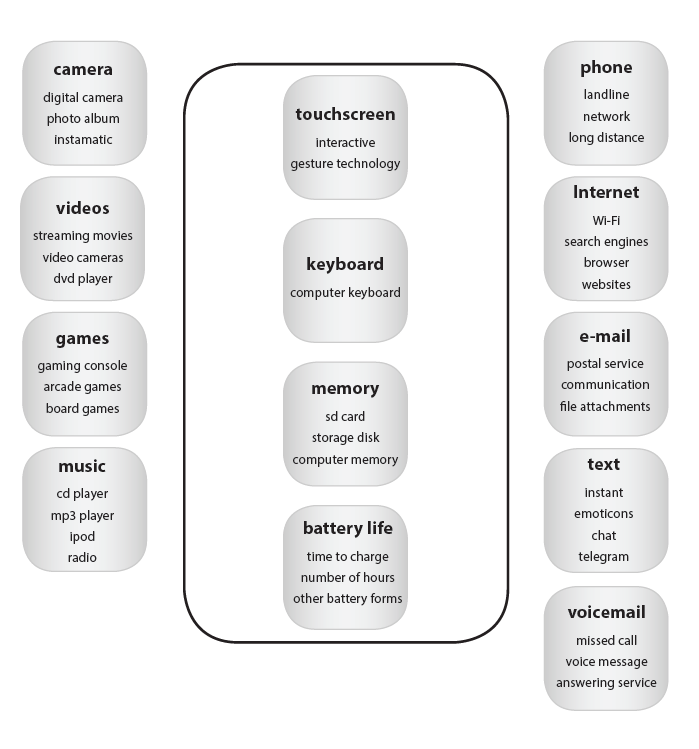
Student Handout 3 - Worksheet: Smartphone Mind Map

The Technology Foundations Series teaches students to examine technology and innovation within the broader theme of time, continuity and change. Students explore technological innovation. Through research, they “reverse engineer” current digital products to discover the creative thinking process behind all the changes and evolution.

Student Handout 4 - Reference Page: Smartphone Mind Map Example

The Technology Foundations Series teaches students to examine technology and innovation within the broader theme of time, continuity and change. Students explore technological innovation. Through research, they “reverse engineer” current digital products to discover the creative thinking process behind all the changes and evolution.

Print

Student Handout 3 - Worksheet: Smartphone Mind Map


Lesson - Technology Foundations Series: Innovation through the 20th Century

The Technology Foundations Series teaches students to examine technology and innovation within the broader theme of time, continuity and change. Students explore technological innovation. Through research, they “reverse engineer” current digital products to discover the creative thinking process behind all the changes and evolution.

Student Handout 1 - Reference Page: Introducing SCAMPER

The Technology Foundations Series teaches students to examine technology and innovation within the broader theme of time, continuity and change. Students explore technological innovation. Through research, they “reverse engineer” current digital products to discover the creative thinking process behind all the changes and evolution.

Teacher Reference Page - Discussion Guide: Re-Discovering Modern History

The Technology Foundations Series teaches students to examine technology and innovation within the broader theme of time, continuity and change. Students explore technological innovation. Through research, they “reverse engineer” current digital products to discover the creative thinking process behind all the changes and evolution.

Student Handout 2 - Reference Page: Innovation History Project

The Technology Foundations Series teaches students to examine technology and innovation within the broader theme of time, continuity and change. Students explore technological innovation. Through research, they “reverse engineer” current digital products to discover the creative thinking process behind all the changes and evolution.

Student Handout 3 - Worksheet: Smartphone Mind Map

The Technology Foundations Series teaches students to examine technology and innovation within the broader theme of time, continuity and change. Students explore technological innovation. Through research, they “reverse engineer” current digital products to discover the creative thinking process behind all the changes and evolution.

Student Handout 4 - Reference Page: Smartphone Mind Map Example

The Technology Foundations Series teaches students to examine technology and innovation within the broader theme of time, continuity and change. Students explore technological innovation. Through research, they “reverse engineer” current digital products to discover the creative thinking process behind all the changes and evolution.

Print

Student Handout 4 - Reference Page: Smartphone Mind Map Example

image.png


Lesson - Technology Foundations Series: Innovation through the 20th Century

The Technology Foundations Series teaches students to examine technology and innovation within the broader theme of time, continuity and change. Students explore technological innovation. Through research, they “reverse engineer” current digital products to discover the creative thinking process behind all the changes and evolution.

Student Handout 1 - Reference Page: Introducing SCAMPER

The Technology Foundations Series teaches students to examine technology and innovation within the broader theme of time, continuity and change. Students explore technological innovation. Through research, they “reverse engineer” current digital products to discover the creative thinking process behind all the changes and evolution.

Teacher Reference Page - Discussion Guide: Re-Discovering Modern History

The Technology Foundations Series teaches students to examine technology and innovation within the broader theme of time, continuity and change. Students explore technological innovation. Through research, they “reverse engineer” current digital products to discover the creative thinking process behind all the changes and evolution.

Student Handout 2 - Reference Page: Innovation History Project

The Technology Foundations Series teaches students to examine technology and innovation within the broader theme of time, continuity and change. Students explore technological innovation. Through research, they “reverse engineer” current digital products to discover the creative thinking process behind all the changes and evolution.

Student Handout 3 - Worksheet: Smartphone Mind Map

The Technology Foundations Series teaches students to examine technology and innovation within the broader theme of time, continuity and change. Students explore technological innovation. Through research, they “reverse engineer” current digital products to discover the creative thinking process behind all the changes and evolution.

Student Handout 4 - Reference Page: Smartphone Mind Map Example

The Technology Foundations Series teaches students to examine technology and innovation within the broader theme of time, continuity and change. Students explore technological innovation. Through research, they “reverse engineer” current digital products to discover the creative thinking process behind all the changes and evolution.

Print

Student Handout - Worksheet: What Are Wikis?

What are Wikis?image.png

Wikis are Web sites developed collaboratively by a community of users, allowing any user to add and edit content. Wikipedia is an example of an open encyclopedia.
However, not all wikis are encyclopedias. They can be used among a family to update family members about life events. They could be used by corporations for employees to post on topics and expertise.


Lesson - Wise Use of Wikis

Students learn about wikis, and they explore the beneficial uses of wikis in education. They use wiki technology to publish written work including links to online sources and digital media. Students plan, revise, edit, and incorporate peer feedback to produce quality written work based on an identified audience and purpose. Students adopt e-Safety and responsible use guidelines while engaged in this technology-based project.

Student Handout - Worksheet: What Are Wikis?

Students learn about wikis, and they explore the beneficial uses of wikis in education. They use wiki technology to publish written work including links to online sources and digital media. Students plan, revise, edit, and incorporate peer feedback to produce quality written work based on an identified audience and purpose. Students adopt e-Safety and responsible use guidelines while engaged in this technology-based project.

Print

Student Handout - Worksheet: The Influential Power of Media

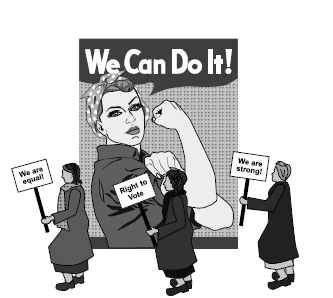
image.pngMedia is an important and powerful tool. Every day, people are affected by the media images they see – sometimes they rush out and purchase something, other times they are influenced to laugh and cry, and sometimes the media even influences behavior.

In fact, media so influences behavior it is often directly used by corporate entities, the government and public service campaigns to reach out and change people’s behavior.


Lesson - The Power of Media (High School)

Students come to understand that media has the power to change perceptions and behavior. They examine the influence of the media in history and on modern culture. Students identify ways to effectively use media in order to address issues that matter to them.

Student Handout - Worksheet: The Influential Power of Media

Students come to understand that media has the power to change perceptions and behavior. They examine the influence of the media in history and on modern culture. Students identify ways to effectively use media in order to address issues that matter to them.

Print

Student Handout 5 - Empowerment: iDrive Student Advisory Board Flyer


Lesson – Webcast: Security & Cyber Citizenship

Students investigate online threats to homeland security an public safety brought about by hactivists, hate groups, gangs and terrorist organizations. They acquire and use key terms while discussing the rights and responsibilities of digital citizenship. They analyze the social and legal consequences of countering these rights and responsibilities, and arrange a meeting for community leaders aimed toward devising solutions to homeland security and public safety issues that arise online.

Student Handout 1 - Empowerment: Host a Community Leaders' Townhall Meeting

Students investigate online threats to homeland security an public safety brought about by hactivists, hate groups, gangs and terrorist organizations. They acquire and use key terms while discussing the rights and responsibilities of digital citizenship. They analyze the social and legal consequences of countering these rights and responsibilities, and arrange a meeting for community leaders aimed toward devising solutions to homeland security and public safety issues that arise online.

Student Handout 2 - Empowerment: Short Form Documentary

Students investigate online threats to homeland security an public safety brought about by hactivists, hate groups, gangs and terrorist organizations. They acquire and use key terms while discussing the rights and responsibilities of digital citizenship. They analyze the social and legal consequences of countering these rights and responsibilities, and arrange a meeting for community leaders aimed toward devising solutions to homeland security and public safety issues that arise online.

Student Handout 3 - Empowerment: Personal Release Form

Students investigate cyber security issues. They acquire and use technical terminology related to cyber security while discussing the ramifications for lack of security and the actions that promote the spread of malicious code. Students then describe four basic steps to ensure digital security and create informative materials to educate others.

Student Handout 4 - Empowerment: iDrive Toolkit

Students investigate cyber security issues. They acquire and use technical terminology related to cyber security while discussing the ramifications for lack of security and the actions that promote the spread of malicious code. Students then describe four basic steps to ensure digital security and create informative materials to educate others.

Student Handout 5 - Empowerment: iDrive Student Advisory Board Flyer

Students investigate cyber security issues. They acquire and use technical terminology related to cyber security while discussing the ramifications for lack of security and the actions that promote the spread of malicious code. Students then describe four basic steps to ensure digital security and create informative materials to educate others.

Teacher Reference Page - iDrive Teacher Toolkit

Students investigate cyber security issues. They acquire and use technical terminology related to cyber security while discussing the ramifications for lack of security and the actions that promote the spread of malicious code. Students then describe four basic steps to ensure digital security and create informative materials to educate others.

Webcast Video - Security: Cyber Citizenship

Students investigate cyber security issues. They acquire and use technical terminology related to cyber security while discussing the ramifications for lack of security and the actions that promote the spread of malicious code. Students then describe four basic steps to ensure digital security and create informative materials to educate others.

Print

Lesson Plan – Introduction to X: First Class Post

Description

Lesson Overview

The purpose of this lesson is to introduce X (formerly Twitter) as a tool within the classroom environment.


Unit - Safe Social Networking: X (Formally Twitter) for the K-8 Classroom

Unit - Safe Social Networking: X (Formally Twitter) for the K-8 Classroom

When used as an integral part of the classroom protocol and routine, Twitter can offer unique and meaningful learning opportunities that model responsible use of social media and improved communication between teacher, parents and students. Classroom integration activities are included.

Student Handout 1 - Reference Page: How to Make a Quality Tweet

Student Handout 1 - Reference Page: How to Make a Quality Tweet

When used as an integral part of the classroom protocol and routine, Twitter can offer unique and meaningful learning opportunities that model responsible use of social media and improved communication between teacher, parents and students. Classroom integration activities are included.

Teacher Reference Page 1 - Teacher Guide: Twitter for the K-8 Classroom

Teacher Reference Page 1 - Teacher Guide: Twitter for the K-8 Classroom

When used as an integral part of the classroom protocol and routine, Twitter can offer unique and meaningful learning opportunities that model responsible use of social media and improved communication between teacher, parents and students. Classroom integration activities are included.

Student Handout 2 - Reference Page: Twitter Etiquette

Student Handout 2 - Reference Page: Twitter Etiquette

When used as an integral part of the classroom protocol and routine, Twitter can offer unique and meaningful learning opportunities that model responsible use of social media and improved communication between teacher, parents and students. Classroom integration activities are included.

Student Handout 3 - Reference Page: Hashtag Savvy

Student Handout 3 - Reference Page: Hashtag Savvy

When used as an integral part of the classroom protocol and routine, Twitter can offer unique and meaningful learning opportunities that model responsible use of social media and improved communication between teacher, parents and students. Classroom integration activities are included.

Print

Student Handout 2 - Reference Page: Twitter Etiquette

Netiquette is made from the word “etiquette” and refers to using good manners (the way you behave) when communicating online. Twitter etiquette is about using good manners when using Twitter.

When using Twitter for school assignments, Twitter etiquette includes using the general rules of good behavior you use at school, as well as guidelines for producing good written work.

Twitter in School – Etiquette Tips:


Unit - Safe Social Networking: X (Formally Twitter) for the K-8 Classroom

When used as an integral part of the classroom protocol and routine, Twitter can offer unique and meaningful learning opportunities that model responsible use of social media and improved communication between teacher, parents and students. Classroom integration activities are included.

Lesson Plan – Introduction to X: First Class Post

When used as an integral part of the classroom protocol and routine, Twitter can offer unique and meaningful learning opportunities that model responsible use of social media and improved communication between teacher, parents and students. Classroom integration activities are included.

Student Handout 1 - Reference Page: How to Make a Quality Tweet

When used as an integral part of the classroom protocol and routine, Twitter can offer unique and meaningful learning opportunities that model responsible use of social media and improved communication between teacher, parents and students. Classroom integration activities are included.

Student Handout 3 - Reference Page: Hashtag Savvy

When used as an integral part of the classroom protocol and routine, Twitter can offer unique and meaningful learning opportunities that model responsible use of social media and improved communication between teacher, parents and students. Classroom integration activities are included.

Teacher Reference Page 1 - Teacher Guide: Twitter for the K-8 Classroom

When used as an integral part of the classroom protocol and routine, Twitter can offer unique and meaningful learning opportunities that model responsible use of social media and improved communication between teacher, parents and students. Classroom integration activities are included.

Teacher Reference Page 2 - Class Participation Permission Slip

When used as an integral part of the classroom protocol and routine, Twitter can offer unique and meaningful learning opportunities that model responsible use of social media and improved communication between teacher, parents and students. Classroom integration activities are included.

Teacher Reference Page 3 - Social Media Account Request Form

When used as an integral part of the classroom protocol and routine, Twitter can offer unique and meaningful learning opportunities that model responsible use of social media and improved communication between teacher, parents and students. Classroom integration activities are included.

Reference Page - COPPA: Protecting a Child's Right to Privacy

Students relate online privacy to personal safety in a class discussion about age-appropriate sites and apps. Through exploration of online registration forms and profiles, students discover the importance of following age requirements (COPPA) and protecting online identity. Students create a mock-up of a safe and secure online profile as part of their Empowerment Project: the designe of a virtual world called Sock Puppet Nation.

Print

Student Handout 1 - Reference Page: How to Make a Quality Tweet

A tweet is limited to 140 characters, so it usually takes some thought to make the best use of those characters!

A Quality Tweet is:


Unit - Safe Social Networking: X (Formally Twitter) for the K-8 Classroom

When used as an integral part of the classroom protocol and routine, Twitter can offer unique and meaningful learning opportunities that model responsible use of social media and improved communication between teacher, parents and students. Classroom integration activities are included.

Lesson Plan – Introduction to X: First Class Post

When used as an integral part of the classroom protocol and routine, Twitter can offer unique and meaningful learning opportunities that model responsible use of social media and improved communication between teacher, parents and students. Classroom integration activities are included.

Student Handout 2 - Reference Page: Twitter Etiquette

When used as an integral part of the classroom protocol and routine, Twitter can offer unique and meaningful learning opportunities that model responsible use of social media and improved communication between teacher, parents and students. Classroom integration activities are included.

Student Handout 3 - Reference Page: Hashtag Savvy

When used as an integral part of the classroom protocol and routine, Twitter can offer unique and meaningful learning opportunities that model responsible use of social media and improved communication between teacher, parents and students. Classroom integration activities are included.

Teacher Reference Page 1 - Teacher Guide: Twitter for the K-8 Classroom

When used as an integral part of the classroom protocol and routine, Twitter can offer unique and meaningful learning opportunities that model responsible use of social media and improved communication between teacher, parents and students. Classroom integration activities are included.

Teacher Reference Page 2 - Class Participation Permission Slip

When used as an integral part of the classroom protocol and routine, Twitter can offer unique and meaningful learning opportunities that model responsible use of social media and improved communication between teacher, parents and students. Classroom integration activities are included.

Teacher Reference Page 3 - Social Media Account Request Form

When used as an integral part of the classroom protocol and routine, Twitter can offer unique and meaningful learning opportunities that model responsible use of social media and improved communication between teacher, parents and students. Classroom integration activities are included.

Reference Page - COPPA: Protecting a Child's Right to Privacy

Students relate online privacy to personal safety in a class discussion about age-appropriate sites and apps. Through exploration of online registration forms and profiles, students discover the importance of following age requirements (COPPA) and protecting online identity. Students create a mock-up of a safe and secure online profile as part of their Empowerment Project: the designe of a virtual world called Sock Puppet Nation.

Subscribe to History