Print

Multimedia Resource - Song: Know the Turf

Description

Click the “Play” icon to play this audio file (.MP3) directly from the platform on your computer or device.

To provide your school or school district with necessary data to verify and report lesson implementation, play this resource each time that you use this slideshow for classroom instruction.


Lesson Plan - Music and Movement: Know the Turf

Lesson Plan - Music and Movement: Know the Turf

As part of i-SAFE’s Music and Movement series, students sing along with the song “Know the Turf” which reinforces the message that, before going online, they should know how to stay safe.

Student Handout 1 - Reference Page: Know the Turf Lyrics

Student Handout 1 - Reference Page: Know the Turf Lyrics

As part of i-SAFE’s Music and Movement series, students sing along with the song “Know the Turf” which reinforces the message that, before going online, they should know how to stay safe.

Student Handout 2 - Worksheet: i-Buddy Stick Puppet

Student Handout 2 - Worksheet: i-Buddy Stick Puppet

As part of i-SAFE’s Music and Movement series, students sing along with the song “Know the Turf” which reinforces the message that, before going online, they should know how to stay safe.

Lesson Plan - Grade 2: Cyber Community

Lesson Plan - Grade 2: Cyber Community

Students review the concepts of community and citizenship, and they build upon their understanding of online communities and digital citizenship in a collaborative class discussion. They then listen to a narrative that describes how the central character gets lost online, yet is able to return to the appropriate website and after asking for help from his parent. Students come to understand that citizens belong to physical and digital communities and that community rules and guidelines help to keep citizens safe. Students acquire and use terms related to technology.

Print

Multimedia Resource - Song: i-S-A-F-E

Description

Click the “Play” icon to play this audio file (.MP3) directly from the platform on your computer or device.

To provide your school or school district with necessary data to verify and report lesson implementation, play this resource each time that you use this slideshow for classroom instruction.


Lesson Plan - Music and Movement: i-S-A-F-E

Lesson Plan - Music and Movement: i-S-A-F-E

As part of i-SAFE’s Music and Movement series of lessons, students sing along with the song, “i-S-A-F-E” and gain an understanding of a key Internet safety principle: Ask an adult for permission and guidance before going online. They participate in a collaborative class discussion, acquire and use vocabulary terms, and practice print concepts.

Teacher Reference Page 1 : i-S-A-F-E Sheet Music

Teacher Reference Page 1 : i-S-A-F-E Sheet Music

As part of i-SAFE’s Music and Movement series of lessons, students sing along with the song, “i-S-A-F-E” and gain an understanding of a key Internet safety principle: Ask an adult for permission and guidance before going online. They participate in a collaborative class discussion, acquire and use vocabulary terms, and practice print concepts.

Teacher Reference Page 2: Answer Key - What i-S-A-F-E Means

Teacher Reference Page 2: Answer Key - What i-S-A-F-E Means

As part of i-SAFE’s Music and Movement series of lessons, students sing along with the song, “i-S-A-F-E” and gain an understanding of a key Internet safety principle: Ask an adult for permission and guidance before going online. They participate in a collaborative class discussion, acquire and use vocabulary terms, and practice print concepts.

Student Handout 1 - Reference Page:i-S-A-F-E Lyrics

Student Handout 1 - Reference Page:i-S-A-F-E Lyrics

As part of i-SAFE’s Music and Movement series of lessons, students sing along with the song, “i-S-A-F-E” and gain an understanding of a key Internet safety principle: Ask an adult for permission and guidance before going online. They participate in a collaborative class discussion, acquire and use vocabulary terms, and practice print concepts.

Student Handout 2 - Worksheet: What i-S-A-F-E Means

Student Handout 2 - Worksheet: What i-S-A-F-E Means

As part of i-SAFE’s Music and Movement series of lessons, students sing along with the song, “i-S-A-F-E” and gain an understanding of a key Internet safety principle: Ask an adult for permission and guidance before going online. They participate in a collaborative class discussion, acquire and use vocabulary terms, and practice print concepts.

Lesson Plan - Grade 2: Cyber Community

Lesson Plan - Grade 2: Cyber Community

Students review the concepts of community and citizenship, and they build upon their understanding of online communities and digital citizenship in a collaborative class discussion. They then listen to a narrative that describes how the central character gets lost online, yet is able to return to the appropriate website and after asking for help from his parent. Students come to understand that citizens belong to physical and digital communities and that community rules and guidelines help to keep citizens safe. Students acquire and use terms related to technology.

Print

Student Handout 3 - Empowerment Project: iDrive Toolkit

Click on the resource below to view in full screen.


Teacher Reference Page - Empowerment Project: iDrive Toolkit

Prepare students to make a positive influence on the world with iDrive. iDrive is the Youth Outreach and Empowerment program of i-SAFE. Student-driven projects promote digital citizenship by empowering students to purposefully engage online and to deeply contribute to their communities.

Student Handout 4 - Empowerment: iDrive Student Advisory Board Flyer

Prepare students to make a positive influence on the world with iDrive. iDrive is the Youth Outreach and Empowerment program of i-SAFE. Student-driven projects promote digital citizenship by empowering students to purposefully engage online and to deeply contribute to their communities.

Print

Student Handout 2 - Empowerment: Personal Release Form

I, _______________________________________________________ (Print Name), do hereby grant ISAFE, including (without limitation) its principals, employees, agents, affiliates, contractors, successors and assigns, permission to use my likeness, voice, picture, name, and/or intellectual property (“content”) for print, radio, webcast, film, television or Internet broadcast anywhere throughout the United States and the world, and to edit such material on film or videotape or other media formats.


Lesson Plan - Webcast: Cyber Harassment: Online Bullying and Stalking

Students investigate issues related to cyber harassment, define online bullying and stalking, and identify laws and consequences of cyber bullying. They understand the cause and effects of cyber bullying through Ryan Halligan's story. As a result of their learning, students launch an awareness campaign.

Print

Student Handout 4 - Empowerment: iDrive Empowerment Program

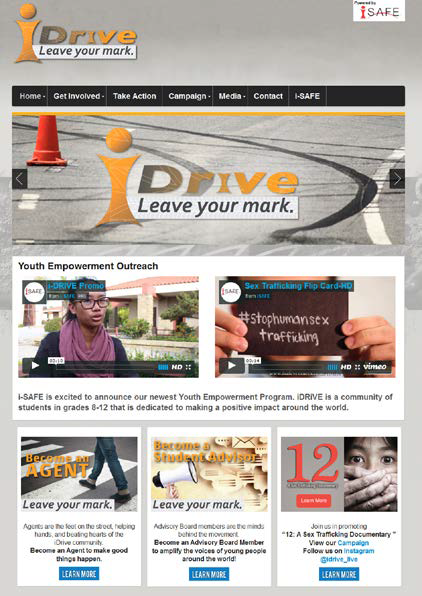
image.pngKnowledge can inspire action in the real world. After completing ISAFE lessons, or even lessons that connect core content to current issues, present students with the opportunity to participate in iDrive social media programming.
iDrive is a youth-led, youth-inspired outreach and empowerment program of ISAFE; a community of young people who are fueled with ideas and driven to do something


Unit - Twitter Guide for Education

Students practice digital citizenship and responsible use through a class Twitter account. They learn how to compose the most effective tweet, use hashtags, protect privacy/security, and apply Twitter etiquette. They use Twitter to collaborate and complete assignments and suggested assignments across curriculum topics. Classroom integration and ideas for school-based social media use are included. Visit www.isafedirect.com for more information on using commercial sites and apps in education.

Teacher Reference Page 1 - Twitter Basics

Students practice digital citizenship and responsible use through a class Twitter account. They learn how to compose the most effective tweet, use hashtags, protect privacy/security, and apply Twitter etiquette. They use Twitter to collaborate and complete assignments and suggested assignments across curriculum topics. Classroom integration and ideas for school-based social media use are included. Visit www.isafedirect.com for more information on using commercial sites and apps in education.

Teacher Reference Page 2 - Getting Started

Students practice digital citizenship and responsible use through a class Twitter account. They learn how to compose the most effective tweet, use hashtags, protect privacy/security, and apply Twitter etiquette. They use Twitter to collaborate and complete assignments and suggested assignments across curriculum topics. Classroom integration and ideas for school-based social media use are included. Visit www.isafedirect.com for more information on using commercial sites and apps in education.

Teacher Reference Page 3 – Privacy Settings

Students practice digital citizenship and responsible use through a class Twitter account. They learn how to compose the most effective tweet, use hashtags, protect privacy/security, and apply Twitter etiquette. They use Twitter to collaborate and complete assignments and suggested assignments across curriculum topics. Classroom integration and ideas for school-based social media use are included. Visit www.isafedirect.com for more information on using commercial sites and apps in education.

Teacher Reference Page 4 - A Connected Learning Community

Students practice digital citizenship and responsible use through a class Twitter account. They learn how to compose the most effective tweet, use hashtags, protect privacy/security, and apply Twitter etiquette. They use Twitter to collaborate and complete assignments and suggested assignments across curriculum topics. Classroom integration and ideas for school-based social media use are included. Visit www.isafedirect.com for more information on using commercial sites and apps in education.

Teacher Reference Page 5 - Twitter Best Practices

Students practice digital citizenship and responsible use through a class Twitter account. They learn how to compose the most effective tweet, use hashtags, protect privacy/security, and apply Twitter etiquette. They use Twitter to collaborate and complete assignments and suggested assignments across curriculum topics. Classroom integration and ideas for school-based social media use are included. Visit www.isafedirect.com for more information on using commercial sites and apps in education.

Teacher Reference Page 6 - Tweet Across the Curriculum

Students practice digital citizenship and responsible use through a class Twitter account. They learn how to compose the most effective tweet, use hashtags, protect privacy/security, and apply Twitter etiquette. They use Twitter to collaborate and complete assignments and suggested assignments across curriculum topics. Classroom integration and ideas for school-based social media use are included. Visit www.isafedirect.com for more information on using commercial sites and apps in education.

Teacher Reference Page 7 - Twitter in Education Permission Slip

Students practice digital citizenship and responsible use through a class Twitter account. They learn how to compose the most effective tweet, use hashtags, protect privacy/security, and apply Twitter etiquette. They use Twitter to collaborate and complete assignments and suggested assignments across curriculum topics. Classroom integration and ideas for school-based social media use are included. Visit www.isafedirect.com for more information on using commercial sites and apps in education.

Teacher Reference Page 8 - Social Media Account Request Form

Students practice digital citizenship and responsible use through a class Twitter account. They learn how to compose the most effective tweet, use hashtags, protect privacy/security, and apply Twitter etiquette. They use Twitter to collaborate and complete assignments and suggested assignments across curriculum topics. Classroom integration and ideas for school-based social media use are included. Visit www.isafedirect.com for more information on using commercial sites and apps in education.

Lesson Plan - Introducing Twitter

Students practice digital citizenship and responsible use through a class Twitter account. They learn how to compose the most effective tweet, use hashtags, protect privacy/security, and apply Twitter etiquette. They use Twitter to collaborate and complete assignments and suggested assignments across curriculum topics. Classroom integration and ideas for school-based social media use are included. Visit www.isafedirect.com for more information on using commercial sites and apps in education.

Student Handout 1 - Reference Page: Crafting a Quality Tweet

Students practice digital citizenship and responsible use through a class Twitter account. They learn how to compose the most effective tweet, use hashtags, protect privacy/security, and apply Twitter etiquette. They use Twitter to collaborate and complete assignments and suggested assignments across curriculum topics. Classroom integration and ideas for school-based social media use are included. Visit www.isafedirect.com for more information on using commercial sites and apps in education.

Student Handout 2 - Reference Page: Twitter Etiquette

Students practice digital citizenship and responsible use through a class Twitter account. They learn how to compose the most effective tweet, use hashtags, protect privacy/security, and apply Twitter etiquette. They use Twitter to collaborate and complete assignments and suggested assignments across curriculum topics. Classroom integration and ideas for school-based social media use are included. Visit www.isafedirect.com for more information on using commercial sites and apps in education.

Student Handout 3 - Reference Page: Hashtag Savvy

Students practice digital citizenship and responsible use through a class Twitter account. They learn how to compose the most effective tweet, use hashtags, protect privacy/security, and apply Twitter etiquette. They use Twitter to collaborate and complete assignments and suggested assignments across curriculum topics. Classroom integration and ideas for school-based social media use are included. Visit www.isafedirect.com for more information on using commercial sites and apps in education.

Print

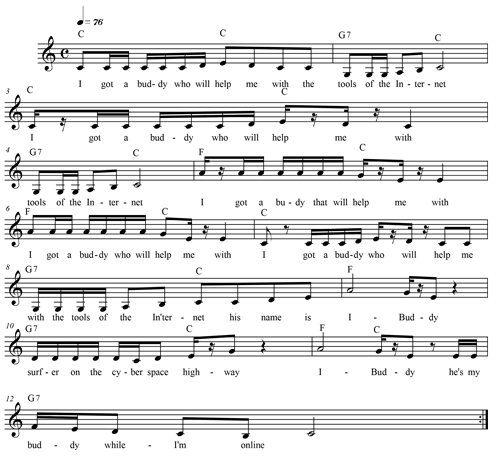
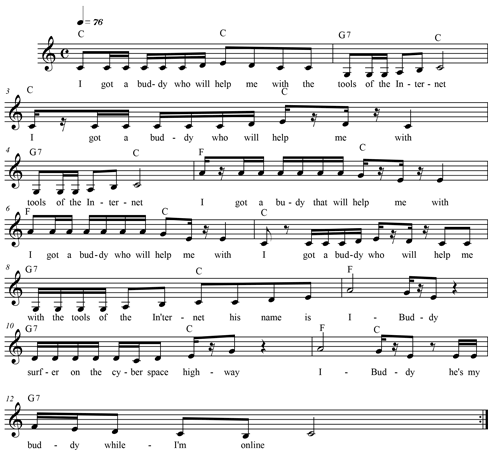
Teacher Reference Page - I've Got a Buddy Sheet Music

Description

image.png


Additional lyrics

I got a buddy who will keep me safe
working on the Internet 4x

I got a buddy who will help me make
Right choices on the Internet 4x


Lesson Plan - Music and Movement: I’ve Got a Buddy

Lesson Plan - Music and Movement: I’ve Got a Buddy

As part of i-SAFE’s Music and Movement series, students create i- Buddy puppets and use them to “dance” to the music while singing along. Through class discussion, students learn that good decisions are an important part of digital citizenship.

Student Handout - Reference Page: I've Got a Buddy Lyrics

Student Handout - Reference Page: I've Got a Buddy Lyrics

As part of i-SAFE’s Music and Movement series, students create i- Buddy puppets and use them to “dance” to the music while singing along. Through class discussion, students learn that good decisions are an important part of digital citizenship.

Student Handout - Worksheet: i-Buddy Puppet

Student Handout - Worksheet: i-Buddy Puppet

As part of i-SAFE’s Music and Movement series, students create i- Buddy puppets and use them to “dance” to the music while singing along. Through class discussion, students learn that good decisions are an important part of digital citizenship.

Multimedia Resource - Song: I've Got a Buddy

Multimedia Resource - Song: I've Got a Buddy

As part of i-SAFE’s Music and Movement series, students create i- Buddy puppets and use them to “dance” to the music while singing along. Through class discussion, students learn that good decisions are an important part of digital citizenship.

Print

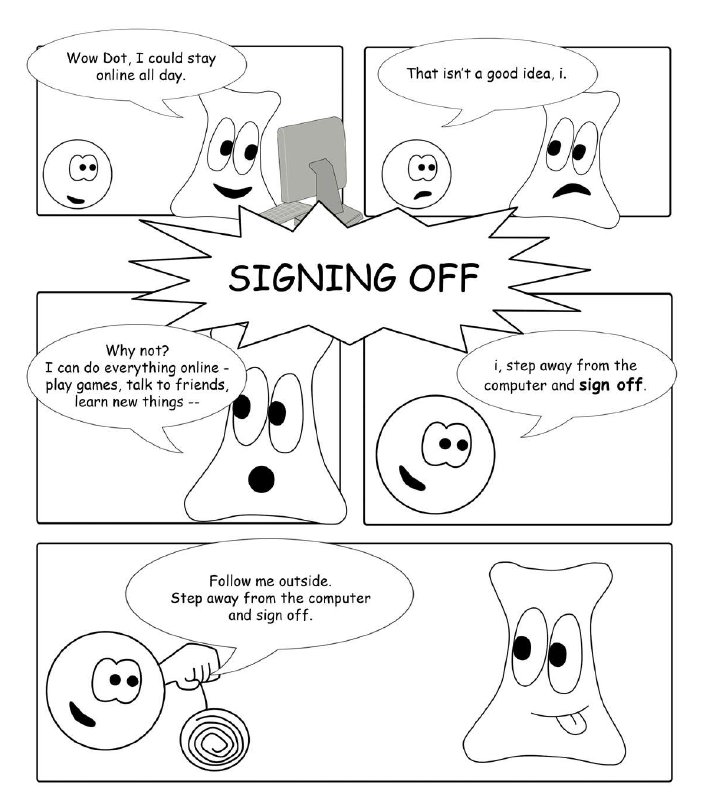
Student Handout 12 - Reference Page: Signing Off

image.png


Unit - Dot & i's Straight-Up Safety Talk

This unit lays a foundation for digital safety. Students acquire and use age-appropriate vocabulary terms related to technology, information security, and online safety. They use illustrations to clarify informational text and present their ideas both verbally and in writing.

Lesson - Signing Off

Students follow along with dialogue between characters Dot & i to learn how to find balance between screen time and real world interaction. Students list reasons to log off or turn off a device. They determine time limits for using technology and identify their favorite offline activities.

Student Handout 12 - Reference Page: Signing Off

Students follow along with dialogue between characters Dot & i to learn how to find balance between screen time and real world interaction. Students list reasons to log off or turn off a device. They determine time limits for using technology and identify their favorite offline activities.

Student Handout 13 - Worksheet: Signing Off

Students follow along with dialogue between characters Dot & i to learn how to find balance between screen time and real world interaction. Students list reasons to log off or turn off a device. They determine time limits for using technology and identify their favorite offline activities.

Print

Student Handout 13 - Worksheet: Signing Off

Keep a Good Head
*There is a time and place for being online. There are many great things to do online
but it is wise to set time limits and boundaries for online activity.

image.pngActivity
What are some great reasons to log off ?    


Unit - Dot & i's Straight-Up Safety Talk

This unit lays a foundation for digital safety. Students acquire and use age-appropriate vocabulary terms related to technology, information security, and online safety. They use illustrations to clarify informational text and present their ideas both verbally and in writing.

Lesson - Signing Off

Students follow along with dialogue between characters Dot & i to learn how to find balance between screen time and real world interaction. Students list reasons to log off or turn off a device. They determine time limits for using technology and identify their favorite offline activities.

Student Handout 12 - Reference Page: Signing Off

Students follow along with dialogue between characters Dot & i to learn how to find balance between screen time and real world interaction. Students list reasons to log off or turn off a device. They determine time limits for using technology and identify their favorite offline activities.

Student Handout 13 - Worksheet: Signing Off

Students follow along with dialogue between characters Dot & i to learn how to find balance between screen time and real world interaction. Students list reasons to log off or turn off a device. They determine time limits for using technology and identify their favorite offline activities.

Print

Student Handout - Reference Page: Graphing

Have you ever wondered why we use graphs? Or what it is that a graph is telling you?

Graphs are used for many different reasons, and can be found all over. You can find graphs in newspapers,
magazines, and on TV. One reason they are used is because they make a visual point - by looking at them you
can quickly interpret data. Many different types of graphs exist, and each has something different about it that
makes it useful in a unique way.


Unit - Integrated Math and Internet Safety

Students apply mathematical skills and concepts to collect, analyze and visually represent data sets related to e-Safety topics such as technology access, digital literacy, parental role in students' digital lives, digital security, cyber bullying, intellectual property, and personal safety. Resulting data sets may utilized as students prepare Empowerment projects and presentations that they will deliver on the school campus, in the local community, online and to the iDrive Student Advisory Board.

Lesson - Introduction to Graphing with Internet Safety

Students understand that statistics can be used to gain information about a population. They gather responses to statistical questions and represent the data as a bar graph.

Print

iDrive Youth Outreach & Empowerment Program

Description

What is iDrive?

iDrive is a youth-led, youth-inspired outreach and empowerment program of


iDrive Youth Outreach & Empowerment Program

iDrive Youth Outreach & Empowerment Program

Prepare students to make a positive influence on the world through iDrive. iDrive is the Youth Outreach and Empowerment program of i-SAFE. Student-driven projects promote digital citizenship by empowering students to purposefully engage online and to deeply contribute to their communities.

iDrive Youth Outreach & Empowerment: Student Toolkit

iDrive Youth Outreach & Empowerment: Student Toolkit

Prepare students to make a positive influence on the world through iDrive. iDrive is the Youth Outreach and Empowerment program of i-SAFE. Student-driven projects promote digital citizenship by empowering students to purposefully engage online and to deeply contribute to their communities.

iDrive Youth Outreach & Empowerment: Teacher Toolkit

iDrive Youth Outreach & Empowerment: Teacher Toolkit

Prepare students to make a positive influence on the world through iDrive. iDrive is the Youth Outreach and Empowerment program of i-SAFE. Student-driven projects promote digital citizenship by empowering students to purposefully engage online and to deeply contribute to their communities.

Subscribe to Health & PE